
Run more than one Roblox at the same time!
TinyAcc is one small app. You simply open it and then launch the game as many times as you want.
How to use
- Close Roblox completely.
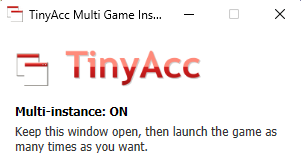
- Open TinyAcc. It will show Multi-instance: ON.
- Launch Roblox as many times as you want.
- If needed, here's a Youtube tutorial for TinyAcc : Youtube
Frequently asked questions
- What does TinyAcc actually do?
- Roblox normally closes your first window when you open a second one. TinyAcc holds the small startup lock that triggers that, so extra windows stay open. It does not touch the game itself.
- Why do I have to close Roblox first?
- The first game window grabs the startup lock when it opens. TinyAcc has to be holding the lock before any game window starts. So, close everything, open TinyAcc, then launch.
- It says "Roblox is already open".
- Close all Roblox windows (check the taskbar), then click Retry in TinyAcc.